Help Desk, NOC, Ded Tech Service

PSA Integrations - Policy Confirmations

  • 1.  PSA Integrations - Policy Confirmations

    Posted 08-02-2024 04:26 PM

    Hi there!

    We've noticed that a few of you opened a ticket with ConnectWise support team due to troubles syncing ticket with Asio. If you're experiencing this issue, it could be due to your policy configurations for PSA integrations aren't filled out for ticket priorities. Don't worry, we're here to help! In Asio, you can adjust these configurations in the Policies section, under Settings. It's a good idea to ensure all items have a mapping to avoid sync failure issues. If you need more guidance with policies, check out this helpful link Enable ConnectWise PSA Policies - ConnectWise. If you need help with the PSA Integration setup, check these links as well Autotask Integration Setup Guide - ConnectWise or  ConnectWise PSA (Manage) Integration Setup Process - ConnectWise

    Mapping from Asio to PSA
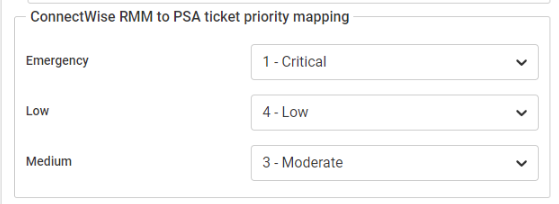
    CW Asio Priority  Description
    Emergency Highest priority items (System down, network offline, Major impact events etc...)
    Medium Important (New user requests, new machine setups, etc...)
    Low Less Urgent (1 user unable to print, Name change etc...)

    Mapping from PSA to Asio

    All priorities that are used must be mapped to an Asio priority, or the ticket with that priority will not sync.

    In the example below, tickets with the priority of "Priority 1 - DONOTUSE", "Priority 2", "Priority 3", "Priority 3 - Medium - DONOTUSE", and "Priority 4" will be allowed to sync, any other priority will fail to sync.

    Let me know if you have any questions and feel free to discuss, we're always happy to help!


    ------------------------------
    Grant Greenawalt
    Manager, Automation Engineer
    ConnectWise
    ------------------------------